
To set the picture, imagine this. You are laying down on a sofa, studying Japanese. An unknown character appears in your materials. What do you do? A normal, reasonable person would get off the couch. A normal, reasonable person would just search for that character in the textbook, which is in another room. A normal, reasonable person would have solved the problem in seconds.
I am not a reasonable person.
I want to add this experience to the growing compendium of evidence against my better judgement: I used an Open Weight AI LLM (Qwen 3.5 9B) to transcribe the book and then add it as an MCP to Claude, just to not have to get off the sofa while studying. Now my laziness is boosted by the fact I can just ask Claude about any character in the book.
Was it worthwhile? No. Did it help me learn Japanese? Doubtful. Was it awesome? Absolutely.
Experimenting with Open Weights
Ever since the AI boom started, I was thinking about its sustainability. What if they cut you off? What if the corporation decides to stop serving you because it is politically inconvenient? What if your government starts blocking your provider? These are not idle threats, since even the International Court of Justice in the Netherlands has been cut off IT services due to sanctions, and cannot even use Credit Cards. And even if they want to keep serving you, datacenters are now being bombed, so we cannot take for granted your data can be safe from geopolitics.
The best way to trust “The Cloud” is to run it yourself. And LLMs are now part of the infrastructure that build modern applications. I believe we should not depend only on the big providers. For resilience we need to be able to host our own intelligence!
(That could also be just me and my paranoid streak.)
My Open Weight LLM Setup is Bazzite Linux
I am running Bazzite Linux for my gaming PC. Why Bazzite? Because its main purpose was gaming. I heard it had good Steam support and good AMD card support. And I wanted a Windows alternative, since I felt let down recently by Microsoft. An atomic distribution made sense since originally I wanted only to use it for gaming and I did not expect to be tinkering with the Operating System. I just wanted a machine that played videogames, nothing else. But it turns out that GPUs with 16 GB of VRAM are great for running models, and I could not resist the temptation to use it for AI. So, instead of playing “Clair Obscur: Expedition 33”, I found myself tinkering with the machine and getting LLMs to run in it.
Then a friend commented that he was running Ollama through Docker and that it was using his video card. That “Docker” comment lit a lightbulb in my head. TIING! I had already tried to run text generation on my PC, but Bazzite did not let me install the AMD ROCm drivers (the AMD equivalent to NVidia's CUDA). My friend reminded me that you can bind hardware to Docker containers. And Bazzite already comes with Podman preinstalled.
So it was only a simple command!
podman run -d --name ollama \
--device /dev/kfd --device /dev/dri \
--group-add keep-groups \
--security-opt label=disable \
-v ollama:/root/.ollama \
-p 0.0.0.0:11434:11434 \
docker.io/ollama/ollama:rocm
The important parts: the “device” flags are the ROCm compute devices. The “security-opt” flags are to get SELinux off my back. The “v” flag is to bind a volume where the files will reside. And the “p” flag allows access from other computers. The image is the ROCm variant of Ollama, not the default one.
After that, you can start the pod with:
podman start ollama
And you can download new models with:
podman exec -it ollama ollama run qwen3.5:9b
A few minutes later I had it all running. I just had nothing productive yet to use this LLM on. A sane, reasonable person would have let it there. A sane, reasonable person would have realized that this was a mission accomplished. A sane, reasonable person would have thought that there was nothing else to gain.
But I am not a reasonable person.
Learning Japanese with LLMs
I let it rest for a few months.
Then I got a new hobby: learning how to read Japanese.I bought Andrew Scott Conning's “Kodansha Kanji Learner's Course” and committed to learning five kanji a day. Kanji are the characters that are used to read and write Japanese. There are 2300 characters in this course. So it will take more than a year of practice to learn enough to be able to read the language.
So my hobby is to lie down on a sofa and practice kanji flashcards (via Anki Droid) every day.
And there comes the problem I talked about earlier: when my flashcards show a character I have forgotten, how can I refresh my memory? Of course I am not getting off my couch to look for that book, that would be too reasonable.
And I am not a reasonable person.
So instead I got the PDF version of the book. Then I vibe coded a new pipeline in python based on that book. The course book has 4 kanji per page, in the format shown in the picture below:
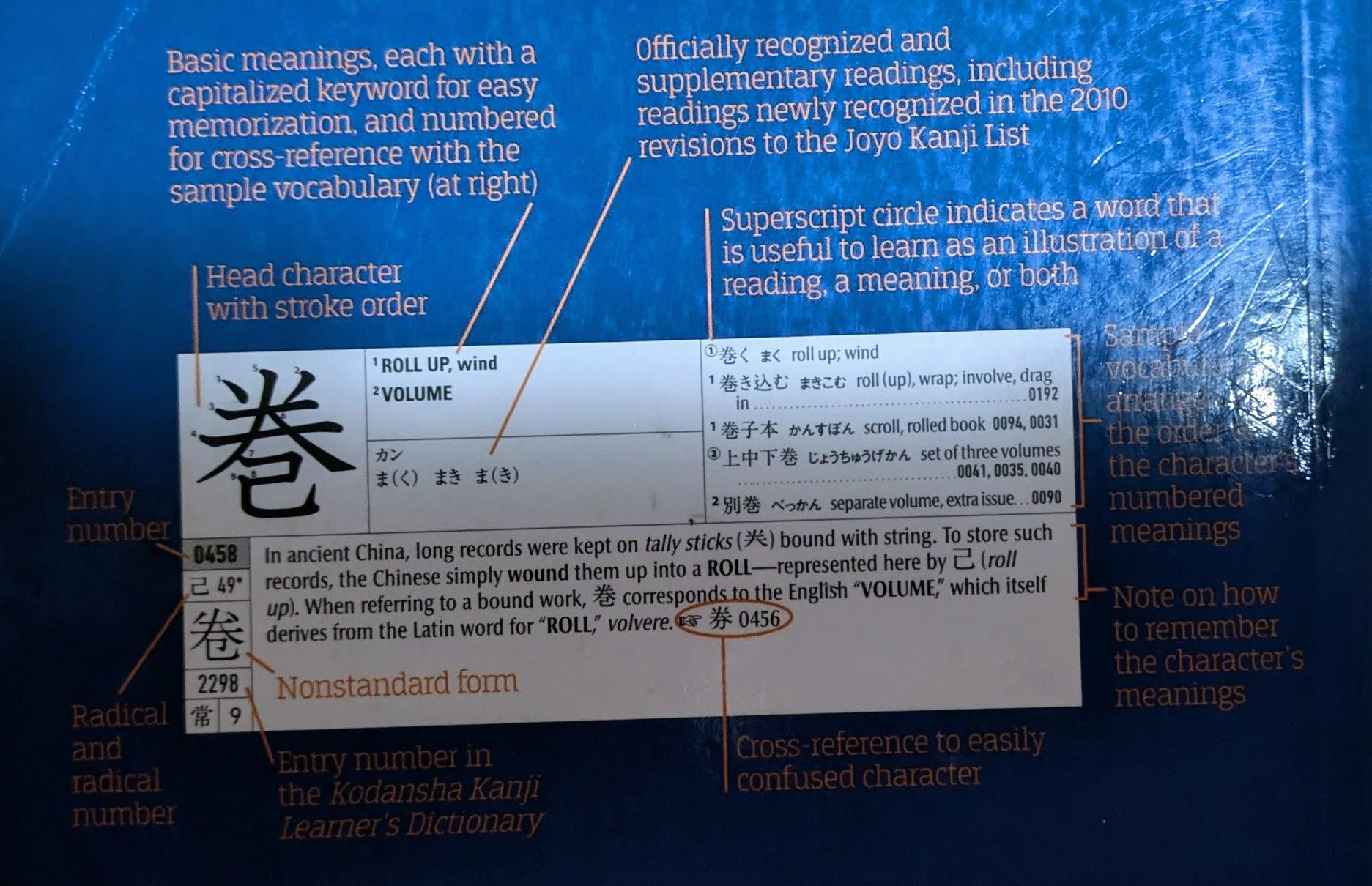
Each kanji has a description text used to learn it and a list of compound words that use it. I also found out about the “Electronic Dictionary Research and Development Group”, available at https://www.edrdg.org, which has been publishing a Japanese Kanji dictionary (Kanjidict2) and a list of Japanese Compound Words (JMDict) since the 1990s. They are published as XML files that python can read. Of course I downloaded both files and integrated them into the new pipeline.
So, the first version of the pipeline worked like this: It opens the PDF, one page at a time, on my laptop. It passes the page to PaddleOCR to extract the text. Then it passes the page image and the extracted text to Qwen 3.5 9B, running on my laptop via Nativ. It only takes the “head kanji” and the “description” from the PDF. It takes the numbering from the page number and position (we know there are four kanji per page, in the exact format shown above). Then it correlates that character with Kanjidict2 to get the readings and meanings, while it gets the compound words from Jmdict. Then it saves the bundle in a SQLite database.
That first version was taking around a minute per page. It would have taken 9.5 hours to parse 575 pages. I could do better.
First: I moved from processing locally in my laptop to hosting Qwen on my gaming PC, as previously described. This reduced time per page to around 30s per page. Then I realized that my GPU utilization in the LLM server looked like a square wave: 100% utilization for 15s, then no utilization for another 15s, then 100% utilization again. Usage was not continuous: there was something taking 15s per image in my laptop.
It turned out to be the PaddleOCR. My laptop was doing the OCR on the CPU before passing the images to Qwen in the server. So I disabled PaddleOCR and passed the image directly to Qwen. It worked! Turns out that doing OCR before passing the image was an unnecessary step, because it did not improve accuracy at all. After removing PaddleOCR the pipeline was taking 15 seconds per page. Around 2 hours in total.
I also added some sanity checks. If parsing failed, then it will try again with Qwen 3.8 27B Q4. I found it was even more precise than Qwen 3.5 9B, but it took 60 seconds to process an image. Maybe it was too big for my GPU, even while quantized to 4 bits?
So I left it running for more than two hours, and at the end I had a Sqlite file about 7 MB in size.
I took that file and vibe coded an MCP server around it, using python's “mcp” library. Then I hosted that server in Render.io. Finally, I added the MCP Server as a Connector to my Claude account.
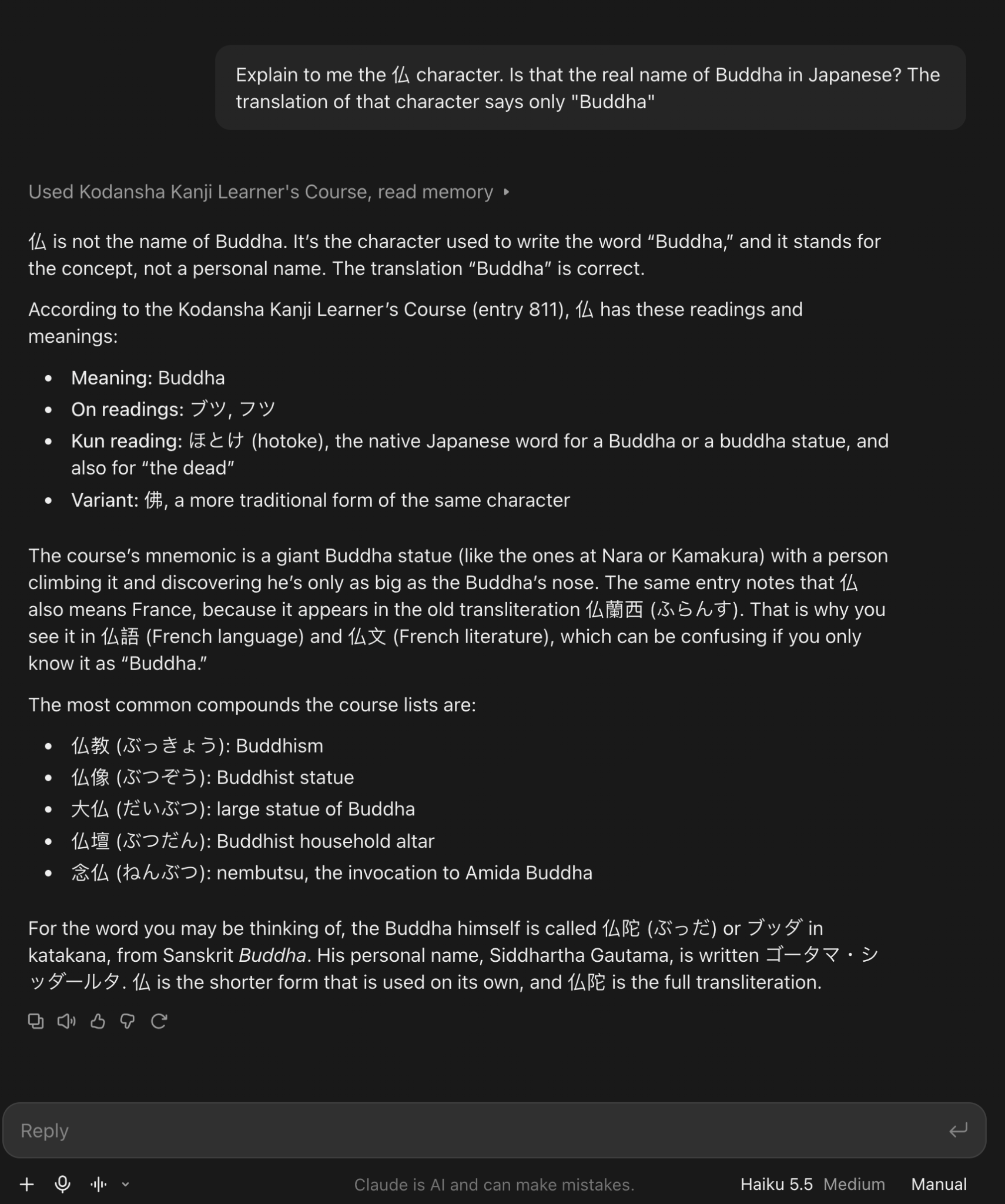
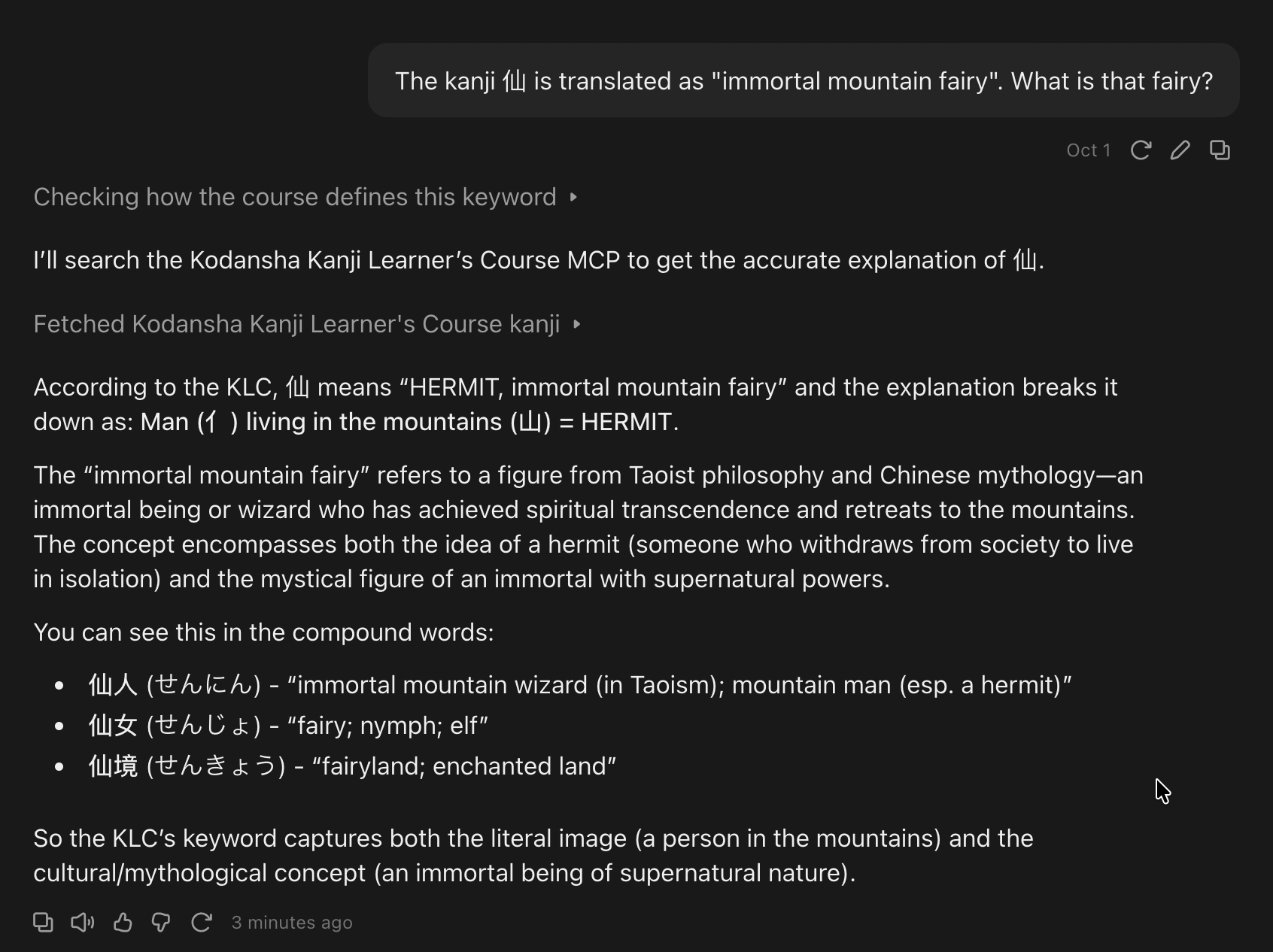
And now I can ask questions about the course back from my couch, and I don't have to get up to search my book while studying! (in this example, notice that Claude retrieved the data from “Kodansha Kanji Learners Course”)
Conclusions, Or was it worth it at the end?
The Bitter Lesson: PaddleOCR requires writing code to process a PDF correctly, While Qwen 3.5 9B is capable of “Zero Shot” processing. It is easier to just use Qwen for OCR, unless you are limited by your hardware, or have a very standardized source document. “In the long run, general approaches that scale with available computational power tend to outperform ones based on domain-specific understanding because they are better at taking advantage of the falling cost of computation over time.” The Bitter Lesson by Richard Sutton, 2019
Making personalized MCPs is very easy, and it gives you the ability to extend your AIs to fulfill your needs.
Do not underestimate Open Weight models. Even the smallest ones, the ones you can run in a personal PC, have capabilities that years ago would have rivalled the leading labs.
Maybe I could just rent an H200? It probably would have taken me less time than optimizing the pipeline,
Was it worth it? I don't think so. Halfway around the process I thought: what If I just take the book with me when I start studying, instead of waiting to need it? It turns out I might not have needed this project at all!
